
AI note taker without a bot
Meeting notes that don't send a stranger to your meeting
Hark records your calls from your own computer, transcribes them right there, and works out who said what. No bot joins, nothing announces itself, and the recording never leaves your machine.
Windows · macOS · Linux · Free forever, AI notes from $12/month
A private meeting recorder that stays out of the way
Most AI note takers work by sending a bot into your call. It shows up in the participant list, some people ask to remove it, and your audio is processed on someone else's servers. Hark takes a different route: it records the computer you're already using. Your microphone and your computer's audio (the other people on the call) are captured as separate tracks and mixed together.
Because Hark records your computer rather than joining the meeting, it works with whatever you use: Zoom, Microsoft Teams, Google Meet, Webex, Slack huddles, or a phone call through your laptop. There's nothing to connect and no calendar to grant access to.
How Hark works
- 1
Press record
Start Hark before or during any call. It records your mic and your computer's audio. You can mute either one while you record, and take screenshots of shared slides as you go.
- 2
It transcribes on your computer
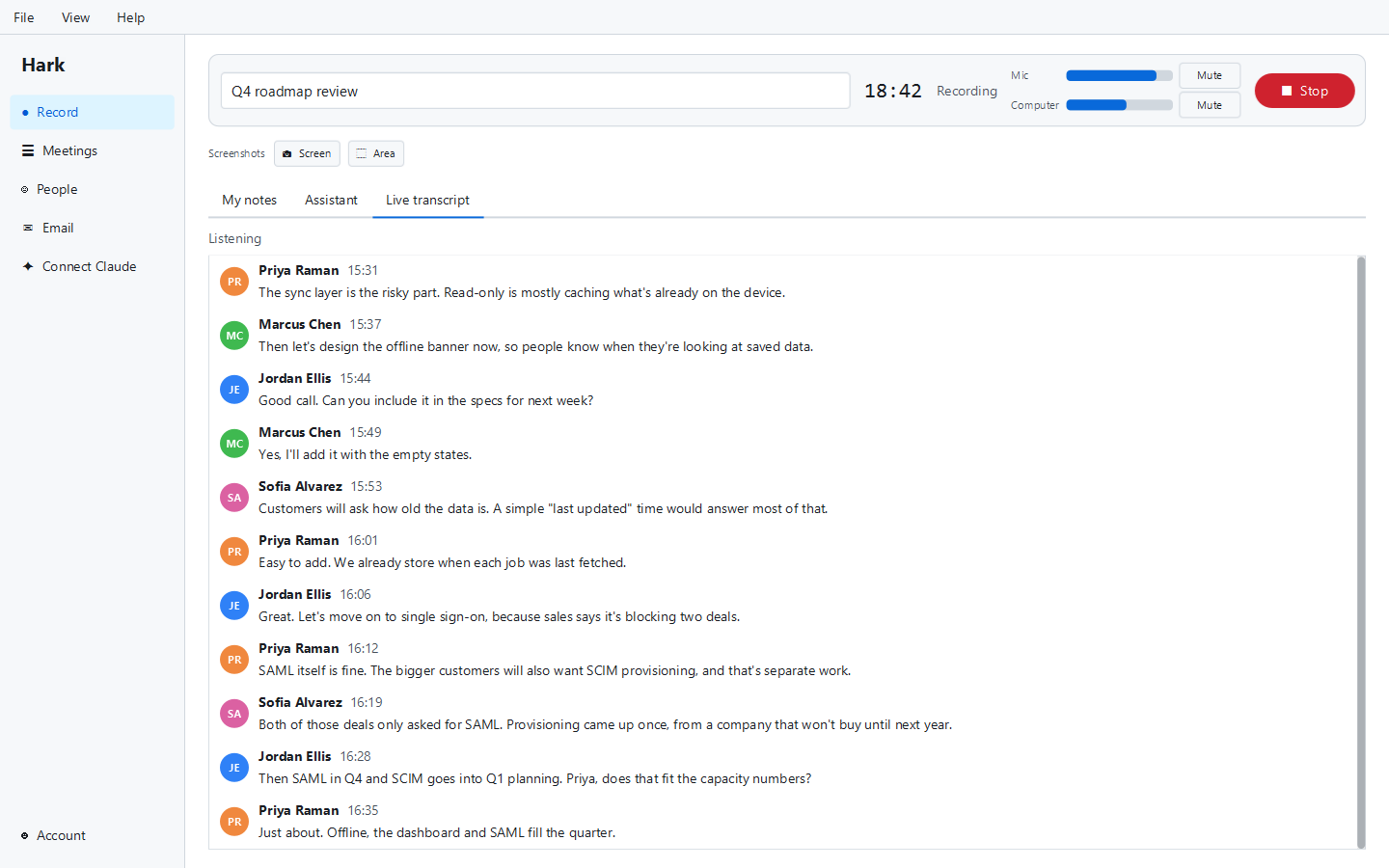
A live transcript appears while the meeting runs. When it ends, Hark makes a second, more accurate pass. The speech model runs locally, so your audio is never uploaded to be transcribed.
- 3
It tells the speakers apart
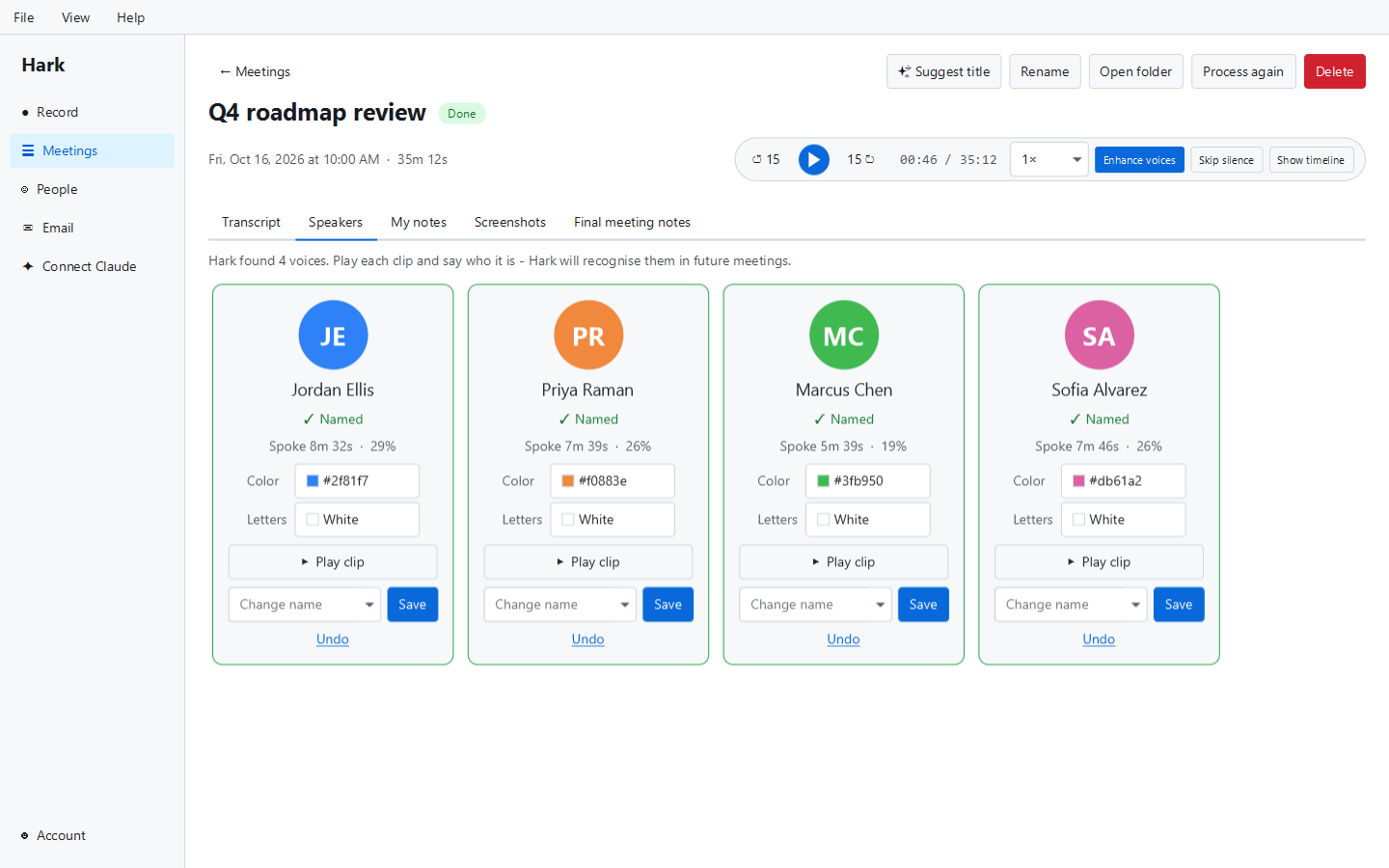
Hark works out how many people spoke and splits the transcript by voice. Name each voice in a click, or mark who's talking live while the meeting runs. With their own signed consent, Hark recognises you and anyone you add.
- 4
Claude writes the notes
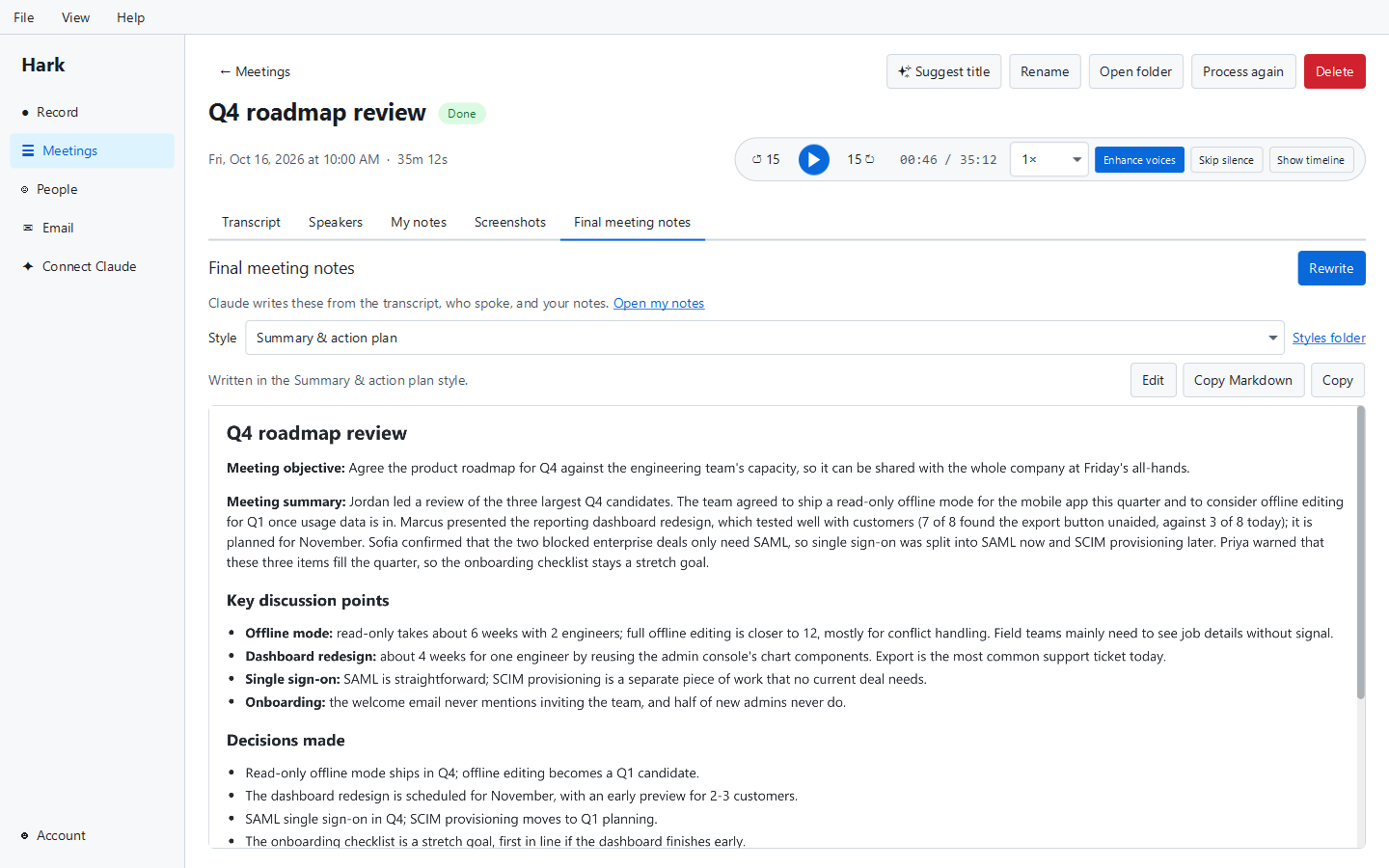
With Hark Pro (free on your first 3 meetings), Claude turns the transcript into clear meeting notes in the style you pick, gives the meeting a title, and tidies up misheard names.
Everything you need after the call
Speaker names in a click
Hark tells the voices apart in every meeting and you name them in a click. It doesn't remember the voices of the people you meet with. Turn on Recognize my voice and Hark labels you automatically; that stays encrypted on your computer and you can turn it off any time. If it mixes two people up, mark who spoke on the timeline and update the transcript. How Hark handles voices
Mark who's talking, live
During the meeting, add the people on the call and press whoever is talking (or name a voice right in the live transcript). A live timeline shows who spoke when, and the final transcript uses your marks, so there's nothing to fix afterwards.
Clean recordings on speakers
Listening without headphones? Hark takes the meeting's sound back out of your microphone, so the other people come from the clear computer audio and your mic records just you.
A player built for reviewing meetings
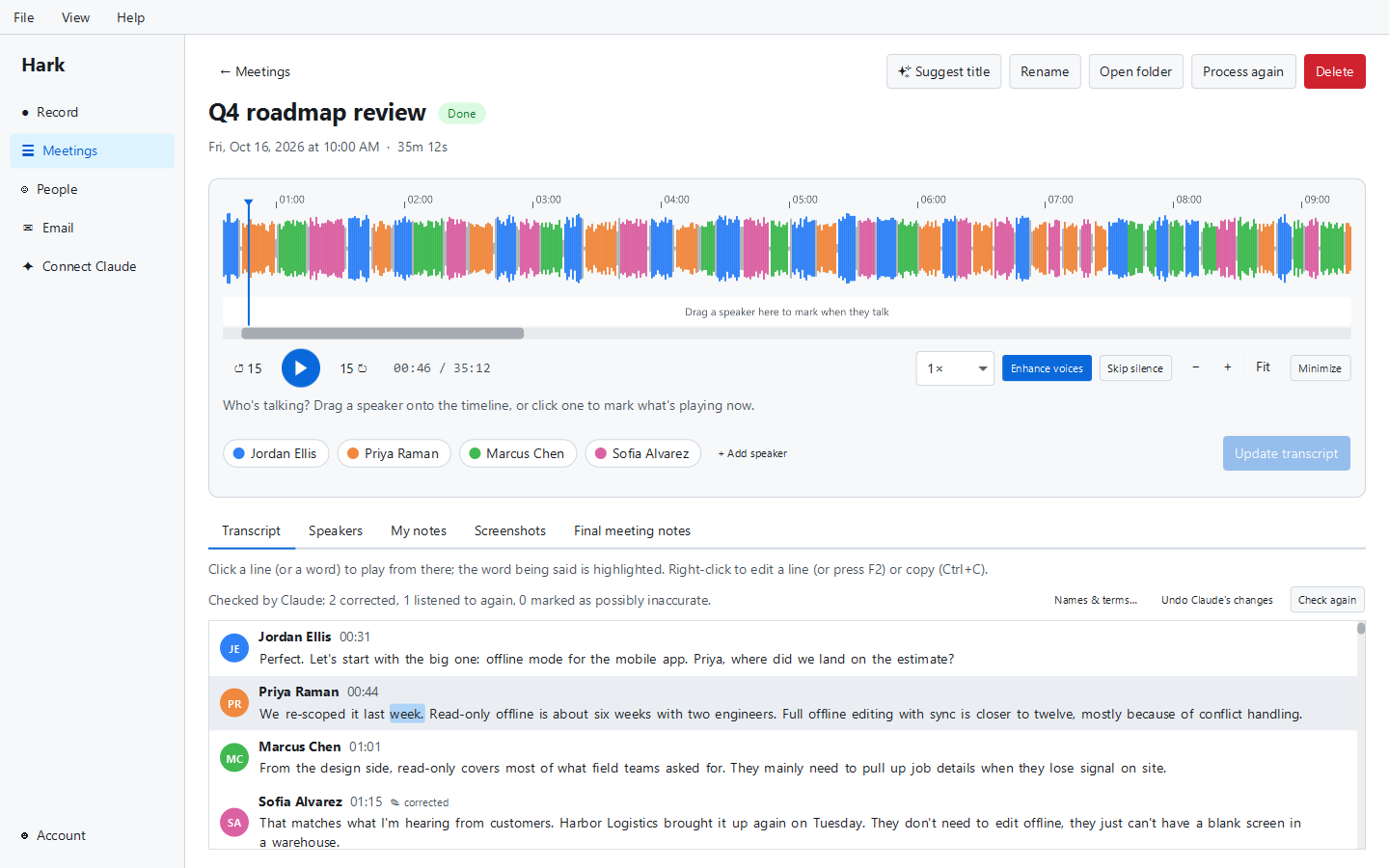
The waveform player speeds up without chipmunk voices and skips the silences, and with Pro, Enhance voices removes background noise and evens out quiet speakers. The word being said is highlighted as you listen, and you can click any word to jump there.
Your notes and the transcript, side by side
Type your own notes in a formatted editor during and after the meeting. Edit any transcript line; your edits are kept and never overwritten. Export transcripts and notes as text or Markdown, or with Pro as Word, PDF or subtitles, and search what was said in every meeting.
Import recordings you already have
Drag in a voice memo, Zoom recording or interview: m4a, mp3, wav, mp4, mov, ogg, opus, flac, webm and more. Hark transcribes it and sorts out the speakers just like a live meeting.
Screenshots in your notes
On Windows, press Ctrl+Alt+S for the whole screen or Ctrl+Alt+A for an area, from any app. Shots land in your notes and on the meeting timeline, and the AI can name and describe them.
AI notes in the style you like
Choose from several note styles or add your own. Turn on live notes during the meeting, ask questions about what was just said, and let AI proofreading fix names and jargon from your "Names & terms" list. Every change can be undone.
Try it on your next call
Download Hark, record one meeting, and see the transcript appear with each voice on its own line. Recording and transcription are free with no limits.
Privacy, in plain words
- ● Your recordings stay on your computer. Audio is never uploaded, not even with sync.
- ● Transcription happens on your computer. After a one-time download of the speech models (about 730 MB), it works offline.
- ● Free use sends nothing anywhere. Recording, transcription and telling speakers apart all happen on your machine.
- ● Only voices whose owners agree. Hark doesn't remember anyone's voice unless they sign its consent themselves at your computer: you, with Recognize my voice, or someone you add. Each voiceprint stays encrypted on that computer, is never uploaded or synced, and lasts 6 months before Hark asks again. Voice data policy
- ● AI features send text, not audio. When Claude writes your notes, the transcript text goes to Claude (by Anthropic) through External Software's relay, which records usage counts, not content.
- ● Sync is optional and end-to-end encrypted. Only your own computers have the key, so we can't read it. It carries transcripts, notes, screenshots, AI notes and settings; never audio, voice data or email.
- ● Hark doesn't train AI on your meetings.
Recording laws vary, and some places require everyone's consent (see consent laws by state). Hark doesn't announce itself in a call, so always tell people you're recording.
A free AI note taker, with AI when you want it
Recording, transcription and speaker names are free forever. Hark Pro adds AI, sync and the power tools. Your first 3 recorded meetings and 1 imported recording get every Pro feature, free, for good, no card needed.
| Free $0, forever | Pro $12/month, cancel any time | |
|---|---|---|
| Unlimited recording (mic + computer audio) | ✓ | ✓ |
| Unlimited transcription on your computer | ✓ | ✓ |
| Speakers told apart, marked live, and recognised with consent | ✓ | ✓ |
| Import recordings, edit, your own notes, task board, text and Markdown export | ✓ | ✓ |
| Claude Desktop / Claude Code connection | ✓ | ✓ |
| Echo removal for meetings heard on speakers | ✓ | ✓ |
| AI meeting notes, titles, live notes and questions | First 3 meetings | ✓ |
| AI proofreading and screenshot descriptions | First 3 meetings | ✓ |
| End-to-end encrypted sync and online backup across up to 5 computers (no audio) | — | ✓ |
| Enhance voices, Word / PDF / subtitle exports | First 3 meetings | ✓ |
| Search every meeting, projects and personal stats | Until your first 3 meetings are used | ✓ |
A free account (sign in with an email code) is needed for both plans. There are no team plans or annual plans.
Already pay for an AI? Ask it about your meetings
Hark runs a small local server that your own AI app can connect to (it uses MCP, the Model Context Protocol): Claude Desktop, Claude Code, OpenAI's Codex, Gemini CLI, GitHub Copilot in VS Code, Cursor, Windsurf, LM Studio or any other app that supports MCP. Hark's Connect AI page shows the steps for each. Then you can ask your AI to summarize last Tuesday's call, find what a client said about the budget, read the live transcript of the meeting you're in, update your task board, or start and stop recording. This connection is free in Hark.
What Hark runs on, and what it doesn't do yet
Systems
- Windows (x64; Windows on ARM runs the x64 build)
- macOS on Apple Silicon and Intel
- Linux x64 and ARM64 (computer audio via PulseAudio or PipeWire)
- About 730 MB of disk space for the speech models, downloaded once on first use
Honest limitations
- On Macs older than macOS 14.2, Hark records the microphone only. Computer audio on a Mac needs macOS 14.2 or later.
- English only. Other languages aren't supported.
- No mobile app, no calendar integration, no team workspaces or CRM integrations.
- Hark doesn't recognise other people from meeting to meeting; you name them in each meeting.
- Audio and screenshots only; Hark doesn't record video.
- It's a brand-new app (version 1.1.2, October 2026), and the installers aren't code-signed yet.
Learn more
Guides
Record Zoom, Teams and Google Meet, transcribe audio files, and take better notes.
Alternatives
How Hark stacks up against Otter, Granola, Fireflies, Fathom and others.
Comparisons
Side-by-side looks at popular AI note takers.
Templates
Free meeting minutes, notes and 1-on-1 templates you can copy.
Comparing tools? Start with our best AI note takers roundup or our guide to AI note takers that don't join the meeting.
Your meetings, on your computer
Free forever for recording, transcription and speaker names. Your first 3 meetings get AI meeting notes and every other Pro feature too, no card needed.
Frequently asked questions
Is there an AI note taker that does not join the meeting as a bot? +
Yes. Hark records the meeting from your own computer instead of sending a bot into the call, so nobody sees a "notetaker has joined" participant. It captures your microphone and your computer's audio, which works with Zoom, Microsoft Teams, Google Meet, Webex and any other app. On a Mac, recording the computer's audio needs macOS 14.2 or later.
Is Hark really free? +
Yes. Unlimited recording, transcription, speaker labels (including marking who's talking live), recognising voices, editing, your own notes, the task board, import, text and Markdown export and the Claude Desktop connection are free forever. You only need a free account, created with an email code and no card. Hark Pro ($12/month) adds AI meeting notes, sync and online backup, Enhance voices, projects and stats, Word, PDF and subtitle exports and search across every meeting. Your first 3 recorded meetings and 1 imported recording get Pro free.
Does Hark upload my recordings? +
No. Recordings never leave your computer, and transcription runs on your computer too. Hark doesn't remember the voices of the people you meet with. If you turn on Recognize my voice, it recognises your own voice, encrypted on your computer and never uploaded. If you use the AI features, the transcript text (not the audio) is sent to Claude to write notes. If you turn on sync, transcripts and notes are end-to-end encrypted, so only your computers can read them, and audio is never synced.
Which languages does Hark transcribe? +
English only at the moment. The speech recognition Hark runs on your computer supports English only, so meetings in other languages will not transcribe well. If most of your meetings are in another language, a different tool will serve you better for now.
Does Hark work on a Mac? +
Yes, Hark runs on Apple Silicon and Intel Macs. On macOS 14.2 or later it records your microphone and the computer's audio (the other people on a call), like on Windows and Linux. macOS asks once for permission to record system audio, and Hark walks you through it after you sign in. On older Macs it records the microphone only. Hark on a Mac also handles in-person meetings, voice memos and recordings you import.
Do I need permission to record a meeting? +
Often, yes. Recording laws differ by place, and some require everyone on the call to agree. Hark does not announce itself in the meeting, so it is up to you to tell people you are recording and get their consent.